
1
Open the Question Bank
After logging in, choose Bank Soal Saya in the left menu, then click Buat Soal Baru.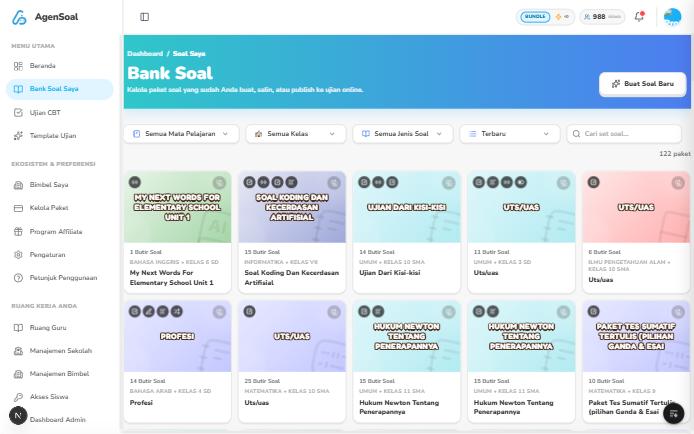
2
Pick a creation method
If you are new, choose Generate Soal AI. The other methods are covered in How to create questions.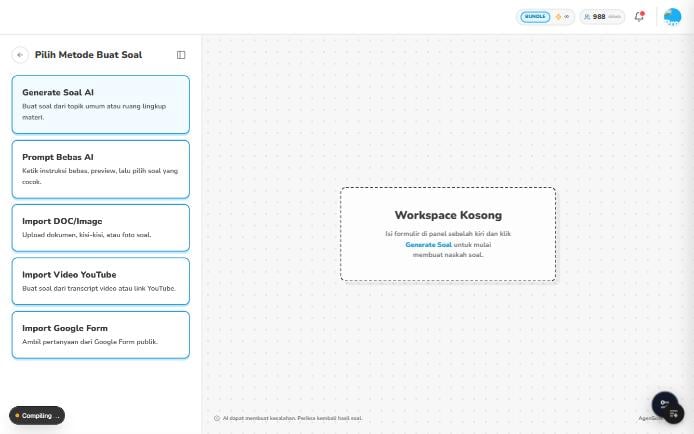
3
Fill in the form and generate
Enter the purpose, grade, subject, and topic, then click Generate Soal. This uses credits.
4
Review the result
AI can make mistakes. Re-read the questions and answers before publishing.
5
Publish
Click Publish Ujian, adjust the exam settings, then click Publish Sekarang. Each setting is explained in Publish an exam.
6
Track it in Ujian CBT
Published exams appear under the Ujian CBT menu.
The app interface is in Indonesian, so button names are shown as they appear on screen.